A long time ago, some readers suggested rendering mathematical formulas on Cool Papers. Many math-oriented papers contain LaTeX-coded mathematical formulas in their abstracts or even titles. If these formulas are not rendered, they appear as a jumble of code, which significantly impacts the reading experience. However, previous tests showed that MathJax, the library responsible for rendering formulas, was largely incompatible with Google Translate and lazy loading. Consequently, despite the long-standing demand, I had not implemented it.
The good news is that after repeated research and debugging, I have finally resolved these compatibility issues over the past two days. Cool Papers can now render mathematical formulas. This article summarizes the solutions for your reference.
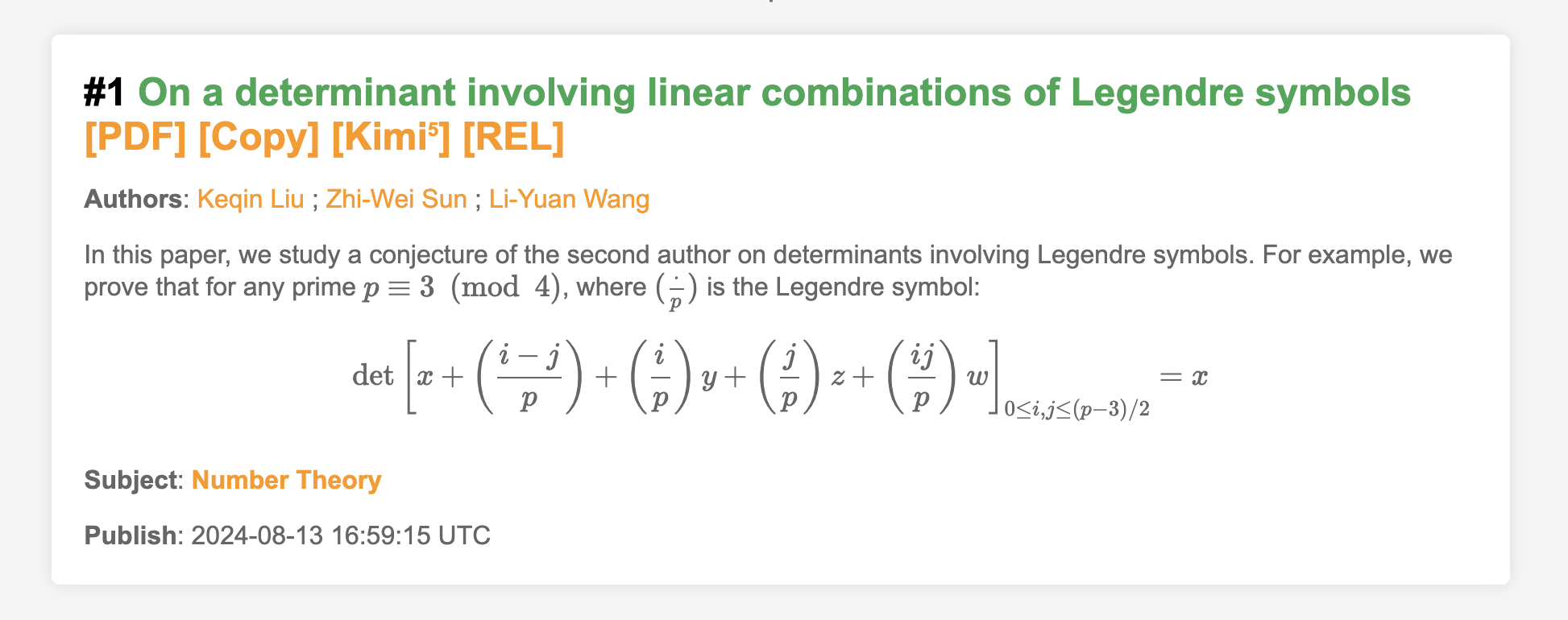
Formula Rendering
For displaying mathematical formulas (LaTeX) in web pages, there are currently two mainstream solutions: MathJax and KaTeX. KaTeX is relatively more lightweight, but its support for LaTeX is not as comprehensive as MathJax. Since this blog has always used MathJax, it was my first choice when considering formula support for Cool Papers.
Similar to Python, MathJax 3.x and 2.x are two quite different systems (the latest version is 3.2.2, and version 4.0 is already in testing). Since most MathJax-related materials found online are for version 2.x, I chose the latest 2.x version, 2.7.9, for Cool Papers (this is also the version used by this blog; notably, the official arXiv website also uses MathJax, specifically version 2.7.3).
For an ordinary webpage, adding mathematical formula rendering is not difficult. You only need to add two segments of code. Below is the reference code used by this blog:
<script type="text/x-mathjax-config">
    MathJax.Hub.Config({
        tex2jax: {inlineMath: [['$','$'], ['\\(','\\)']]},
        TeX: {equationNumbers: {autoNumber: ["AMS"], useLabelIds: true}, extensions: ["AMSmath.js", "AMSsymbols.js", "extpfeil.js"]},
        "HTML-CSS": {linebreaks: {automatic: true, width: "95% container"}, noReflows: false, availableFonts: ["tex"], styles: {".MathJax_Display": {margin: "1em 0em 0.7em;", display: "inline-block!important;"}}},
        "CommonHTML": {linebreaks: {automatic: true, width: "95% container"}, noReflows: false, availableFonts: ["tex"], styles: {".MJXc-display": {margin: "1em 0em 0.7em;", display: "inline-block!important;"}}},
        "SVG": {linebreaks: {automatic: true, width: "95% container"}, styles: {".MathJax_SVG_Display": {margin: "1em 0em 0.7em;", display: "inline-block!important;"}}},
        "PreviewHTML": {linebreaks: {automatic: true, width: "95% container"}}
    });
</script>
<script src="/static/MathJax-2.7.9/MathJax.js?config=TeX-AMS-MML_HTMLorMML"></script>
The Pain of Translation
The above code is effective for general needs and can successfully convert LaTeX code into displayable formulas. However, for Cool Papers, it encountered two “stumbling blocks”: webpage translation and lazy loading. In this section, we first address the first obstacle—webpage translation, specifically the built-in Google Translate in the Chrome browser.
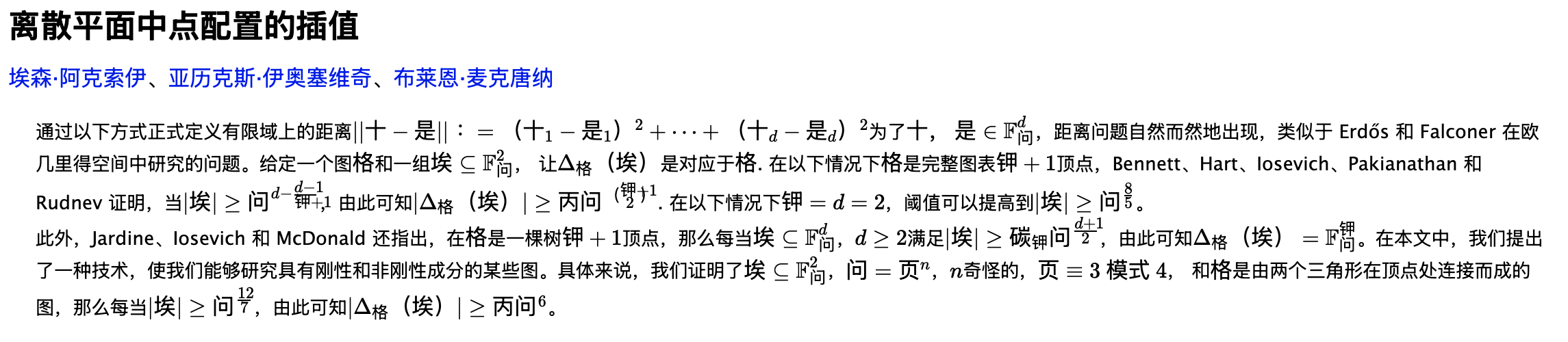
As is well known, the purpose of Cool Papers is to browse papers. Titles and abstracts are in English. For those of us whose native language is Chinese, we often turn on the webpage translation function to speed up reading. While some readers might prefer reading the original English for precision, the demand for webpage translation is undeniable. For the goal of “browsing papers,” machine-translated Chinese content is often sufficient.
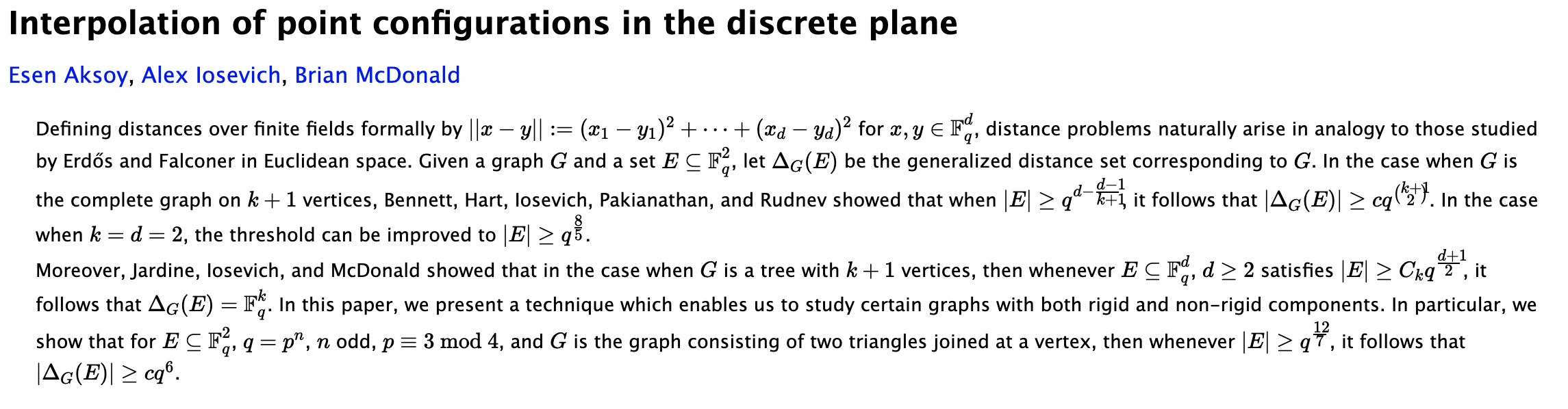
However, for pages with mathematical formulas rendered by MathJax, the effect after Google Translate is “unrecognizable,” nearly turning into unreadable gibberish. Readers can try this themselves with a formula-heavy paper on arXiv, such as 2408.07010. The results are as follows:
The Translation Exemption
The idea to solve this problem is to give the formulas a “translation
exemption,” meaning the formulas should not be translated. After
searching, I found two ways to prevent Google Translate from translating
an element: one is to add the class name
class="notranslate" to the element, and the other is to add
the attribute translate="no". There are also two ways to
add these: one is on the backend (modifying the webpage content before
the server outputs it), and the other is on the frontend (using JS to
modify it after the browser receives the content).
Since MathJax renders formulas in real-time on the frontend, the
backend cannot access the rendered formulas. Therefore, we must choose
the frontend solution. Testing revealed that MathJax adds the class name
MathJax to rendered formulas. Thus, we can extract all
formulas using this class name and append
class="notranslate" via JS. The reference code is:
document.querySelectorAll('.MathJax').forEach(element => element.classList.add('notranslate'));However, note that this line of code must be executed after all mathematical formulas have finished rendering to be effective. How can we ensure the formulas are fully rendered? The most reliable method is to place this code into the MathJax Queue (refer to here):
<script type="text/x-mathjax-config">
    MathJax.Hub.Config({
        tex2jax: {inlineMath: [['$','$'], ['\\(','\\)']]},
        TeX: {equationNumbers: {autoNumber: ["AMS"], useLabelIds: true}, extensions: ["AMSmath.js", "AMSsymbols.js", "extpfeil.js"]},
        "HTML-CSS": {linebreaks: {automatic: true, width: "95% container"}, noReflows: false, availableFonts: ["tex"], styles: {".MathJax_Display": {margin: "1em 0em 0.7em;", display: "inline-block!important;"}}},
        "CommonHTML": {linebreaks: {automatic: true, width: "95% container"}, noReflows: false, availableFonts: ["tex"], styles: {".MJXc-display": {margin: "1em 0em 0.7em;", display: "inline-block!important;"}}},
        "SVG": {linebreaks: {automatic: true, width: "95% container"}, styles: {".MathJax_SVG_Display": {margin: "1em 0em 0.7em;", display: "inline-block!important;"}}},
        "PreviewHTML": {linebreaks: {automatic: true, width: "95% container"}}
    });
    MathJax.Hub.Queue(function() {
        document.querySelectorAll('.MathJax').forEach(element => element.classList.add('notranslate'));
    });
</script>
<script src="/static/MathJax-2.7.9/MathJax.js?config=TeX-AMS-MML_HTMLorMML"></script>
This tells MathJax to execute the function defined in
MathJax.Hub.Queue after it ensures formula rendering is
complete. With this treatment, if you turn on Google Translate after the
formulas are rendered, they will not be translated.
Lazy Loading
The second “stumbling block” for MathJax is lazy loading. In the list view of Cool Papers, because the number of papers to display can be large (hundreds or even thousands), the page does not load all papers at once. Instead, it only displays the first 25 and continues to load the next 25 as the user scrolls near the bottom. This improves response speed without affecting user experience.
Many content-heavy websites use lazy loading; it is a mature
technology. However, MathJax only renders the formulas present when the
page is first opened. Formulas in content loaded later via lazy loading
will not be automatically rendered. Therefore, we must manually trigger
rendering after lazy loading. This is not difficult; the function to
trigger rendering is MathJax.Hub.Typeset. We just need to
add this function after the lazy loading function, similar to:
loadMorePapers();
MathJax.Hub.Typeset();
Note that a simple MathJax.Hub.Typeset does not include
the operation to append notranslate to formulas. To include
that, it should be changed to:
loadMorePapers();
MathJax.Hub.Queue(
    ['Typeset', MathJax.Hub],
    function() {
        document.querySelectorAll('.MathJax').forEach(element => element.classList.add('notranslate'));
    }
);
The Combined Challenge
We have separately solved the compatibility issues between MathJax and Google Translate, and between MathJax and lazy loading. However, when Google Translate and lazy loading appear together, a new problem arises.
Suppose we turn on Google Translate as soon as we enter the page.
When we scroll to the bottom, new papers are lazy-loaded, and Google
Translate is triggered again to translate the newly loaded papers. If we
also set up the manual formula rendering code from the previous section,
the formulas will also be rendered by MathJax. Since Google Translate
and MathJax are triggered simultaneously, but the
class="notranslate" is only added after rendering is
complete, the translation might start before the formulas have the
“exemption medal.” Consequently, the formulas end up being translated
anyway.
To solve this, we must find a way to ensure that Google Translate is
executed only after the formulas are rendered and the
class="notranslate" is added. However, Google Translate is
built into Chrome, and we cannot directly control the browser’s behavior
through the website. It seemed like a dead end, but my testing found
that Google Translate constantly monitors page changes to decide whether
to trigger new translations. Based on this characteristic, we can use
“reverse thinking.”
What is this reverse method? We know that for Cool Papers, the
content to be translated is primarily the titles and abstracts. We can
add class="notranslate" to them initially. Once added,
Google Translate will not actively translate them, whether during the
initial load or lazy loading. Then, after the formulas are rendered, we
can remove the class="notranslate" from the titles and
abstracts. At this point, the browser will recognize that the titles and
abstracts are now translatable, and the translation will be
triggered.
In this way, we successfully ensure that the translation function is triggered only after formula rendering is complete. The reference code is as follows:
loadMorePapers();
MathJax.Hub.Queue(
    ['Typeset', MathJax.Hub],
    function() {
        document.querySelectorAll('.MathJax').forEach(element => element.classList.add('notranslate'));
        document.querySelectorAll('a.title-link, p.summary').forEach(element => element.classList.remove('notranslate'));
    }
);
Summary
Finally, let’s summarize our solution. If your website needs to display mathematical formulas, has lazy loading functionality, and your users require webpage translation, you can follow these steps to achieve maximum compatibility:
1. Add class="notranslate" to all content blocks
containing formulas;
2. Load MathJax in the following manner (where “a.title-link” and “p.summary” are class names of blocks containing formulas):
<script type="text/x-mathjax-config">
    MathJax.Hub.Config({
        tex2jax: {inlineMath: [['$','$'], ['\\(','\\)']]},
        TeX: {equationNumbers: {autoNumber: ["AMS"], useLabelIds: true}, extensions: ["AMSmath.js", "AMSsymbols.js", "extpfeil.js"]},
        "HTML-CSS": {linebreaks: {automatic: true, width: "95% container"}, noReflows: false, availableFonts: ["tex"], styles: {".MathJax_Display": {margin: "1em 0em 0.7em;", display: "inline-block!important;"}}},
        "CommonHTML": {linebreaks: {automatic: true, width: "95% container"}, noReflows: false, availableFonts: ["tex"], styles: {".MJXc-display": {margin: "1em 0em 0.7em;", display: "inline-block!important;"}}},
        "SVG": {linebreaks: {automatic: true, width: "95% container"}, styles: {".MathJax_SVG_Display": {margin: "1em 0em 0.7em;", display: "inline-block!important;"}}},
        "PreviewHTML": {linebreaks: {automatic: true, width: "95% container"}}
    });
    MathJax.Hub.Queue(function() {
        document.querySelectorAll('.MathJax').forEach(element => element.classList.add('notranslate'));
        document.querySelectorAll('a.title-link, p.summary').forEach(element => element.classList.remove('notranslate'));
    });
</script>
<script src="/static/MathJax-2.7.9/MathJax.js?config=TeX-AMS-MML_HTMLorMML"></script>
3. After the lazy loading code, add the following:
MathJax.Hub.Queue(
    ['Typeset', MathJax.Hub],
    function() {
        document.querySelectorAll('.MathJax').forEach(element => element.classList.add('notranslate'));
        document.querySelectorAll('a.title-link, p.summary').forEach(element => element.classList.remove('notranslate'));
    }
);
You are welcome to test the results on Cool Papers. The above solution has been tested and verified on Chrome and Safari, and it applies to the built-in translation features of Chrome and Safari, as well as the built-in translation function of Cool Papers.