In the article "Making MathJax Better Compatible with Google Translate and Lazy Loading", we mentioned that Cool Papers integrated MathJax to parse LaTeX formulas. However, we never expected this to trigger numerous compatibility issues. Although some problems were purely driven by the author’s perfectionism, a solution that is as perfect as possible is ultimately satisfying, so I was willing to spend some effort on it.
In the previous article, we resolved the compatibility between MathJax, Google Translate, and lazy loading. In this article, we will address the conflict between MathJax and Marked.
Problem Description
Markdown is a lightweight markup language that allows people to write documents in an easy-to-read and easy-to-write plain text format. It is currently one of the most popular writing syntaxes. The [Kimi] feature in Cool Papers also essentially outputs in Markdown syntax. However, Markdown is not a language directly understood by browsers; the language for browsers is HTML. Therefore, before displaying it to the user, there is a process of converting Markdown to HTML (rendering).
There are two ways to convert Markdown to HTML: one is on the backend where a server converts Markdown to HTML before sending it to the user; the other is where the user receives Markdown and the browser converts it to HTML on the frontend. The examples in this article are primarily for the latter, but in principle, the same logic can be easily modified for the former. There are many libraries for Markdown conversion on the frontend; Cool Papers uses Marked, which is a relatively lightweight choice.
The method for Marked to render Markdown is simple: just call
marked.parse on the string. When combined with the MathJax setup introduced in
the previous section, LaTeX code can be parsed. However, Markdown and
LaTeX have some overlapping syntax. Consequently, Marked might first
convert the LaTeX code (if any) according to Markdown rules, causing the
subsequent MathJax process to fail because it cannot access the original
LaTeX code.
A reproducible example is as follows:
<div id="content"></div>
<script src="https://cdn.jsdelivr.net/npm/marked/marked.min.js"></script>
<script src="https://cdn.jsdelivr.net/npm/mathjax@2.7.9/MathJax.js?config=TeX-AMS-MML_HTMLorMML"></script>
<script>
    var div = document.getElementById('content');
    div.innerHTML = marked.parse('**cannot** render: \\(a^2 + b^2\\), **can** render: \\\\(c^2 + d^2\\\\)');
    MathJax.Hub.Typeset(div);
</script>
Existing Solutions
It is worth mentioning that the popular blog framework Hexo also uses Marked by default to render Markdown. Therefore, if we search for "MathJax Marked conflict," we can find a lot of information, mostly set against the background of Hexo. One of the more detailed summaries is "Taming Hexo [2] — Conflicts between Hexo and MathJax and Solutions". It summarizes the approaches into the following four types:
1. Manual Escaping: This means not writing correct LaTeX code when writing formulas, but rather writing LaTeX code that "becomes correct only after being rendered by Marked." For example, if the original LaTeX code uses double backslashes
\\, which become a single backslash\after Marked, one might write four backslashes\\\\from the start so that they become double backslashes\\after Marked.2. Protecting Formulas: This idea is even simpler. It leverages the fact that Marked does not render code blocks. By using code block tags to protect the formula, the formula can be extracted and parsed by MathJax after Marked rendering, as described in "Solving the Conflict between MathJax and Markdown". The problem with this approach is that it easily gets confused with normal code blocks.
3. Changing Engines: Switch to a rendering engine that better supports the mixing of Markdown and LaTeX. For Hexo, Pandoc is usually recommended, as seen in "Solving the Conflict between Hexo and MathJax". However, Pandoc is a backend rendering engine, and I have not found a better alternative for frontend rendering.
4. Modifying the Engine: This involves modifying the Marked code to prevent it from rendering certain LaTeX patterns, thereby solving the problem to some extent, as in "Coexistence of Marked.js and MathJax in Hexo". This requires us to summarize rules that are prone to mis-rendering by Marked and handle them one by one.
The first and second solutions require manual modification of the formula code, but since the formulas in Cool Papers are generated by Kimi, they cannot be modified, so these are essentially ruled out. Since I haven’t found a better Markdown frontend rendering engine, solution 3 is also ruled out. While solution 4 can solve the problem to some extent, it is too rule-based, not elegant enough, and only "treats the symptoms rather than the cause," with no way to guarantee that no rules were missed.
Reverse Thinking
In fact, there is a very simple solution to this problem: fundamentally, this is a syntax conflict caused by running Marked before MathJax. What if we reverse it? Run MathJax to render the formulas first, and then use Marked to render the Markdown. Because MathJax can identify mathematical formulas quite strictly, and the rendered results almost never contain Markdown syntax, running MathJax before Marked can fundamentally resolve the conflict.
The reference code is as follows:
<div id="content"></div>
<script src="https://cdn.jsdelivr.net/npm/marked/marked.min.js"></script>
<script src="https://cdn.jsdelivr.net/npm/mathjax@2.7.9/MathJax.js?config=TeX-AMS-MML_HTMLorMML"></script>
<script>
    var div = document.getElementById('content');
    div.innerHTML = '**can** render: \\(a^2 + b^2\\)';
    MathJax.Hub.Queue(
        ['Typeset', MathJax.Hub, div],
        function() {
            div.innerHTML = marked.parse(div.innerHTML);
        }
    );
</script>
Refining for Perfection
The final display effect of the above code is already what we expect, but for readers with perfectionism, it’s still missing something. It has two minor flaws.
The first flaw is that it displays the raw Markdown text first, and only after a short delay (depending on rendering speed) does it show the final rendered effect. Note that outputting raw Markdown directly to the browser looks almost like gibberish. This means the user sees a page of "gibberish" for a moment before the formal page appears, which affects the reading experience. To fix this, we can create a separate element for rendering and only assign it to the current page after rendering is complete:
<div id="content"></div>
<script src="https://cdn.jsdelivr.net/npm/marked/marked.min.js"></script>
<script src="https://cdn.jsdelivr.net/npm/mathjax@2.7.9/MathJax.js?config=TeX-AMS-MML_HTMLorMML"></script>
<script>
    var div = document.getElementById('content');
    var div2 = document.createElement('div');
    div2.innerHTML = '**can** render: \\(a^2 + b^2\\)';
    MathJax.Hub.Queue(
        ['Typeset', MathJax.Hub, div2],
        function() {
            div.innerHTML = marked.parse(div2.innerHTML);
        }
    );
</script>
This way, the user directly sees the rendered effect without the transition of "gibberish" content. The second flaw is that right-clicking the formula no longer displays the MathJax menu:
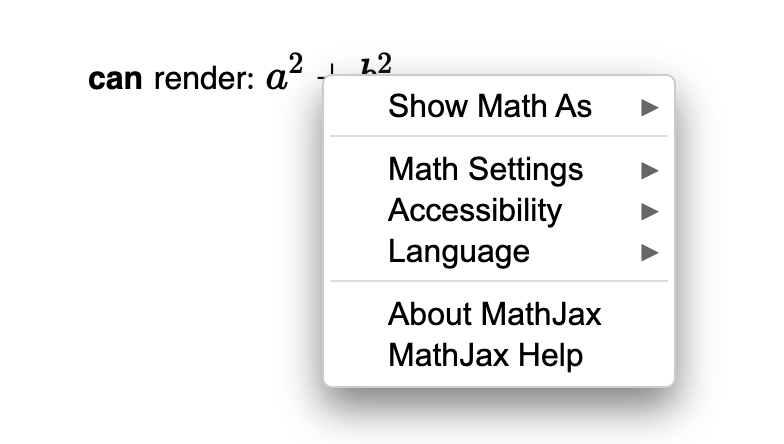
This is easy to understand if you know the principle of custom
right-click menus. Simply put, a custom right-click menu requires
binding an event listener to the element. However, when we modify the
element’s innerHTML, the event listeners are lost. I
thought about this for a long time and eventually discovered by accident
that when we call the MathJax.Hub.Typeset command again,
MathJax automatically re-renders the formulas. So, we just need to
delete the existing formulas based on the code above and then re-render
them:
<div id="content"></div>
<script src="https://cdn.jsdelivr.net/npm/marked/marked.min.js"></script>
<script src="https://cdn.jsdelivr.net/npm/mathjax@2.7.9/MathJax.js?config=TeX-AMS-MML_HTMLorMML"></script>
<script>
    var div = document.getElementById('content');
    var div2 = document.createElement('div');
    div2.innerHTML = '**can** render: \\(a^2 + b^2\\)';
    MathJax.Hub.Queue(
        ['Typeset', MathJax.Hub, div2],
        function() {
            div.innerHTML = marked.parse(div2.innerHTML);
            div.querySelectorAll('.MathJax').forEach(e => e.remove());
            MathJax.Hub.Typeset(div);
        }
    );
</script>
This restores the right-click menu. But that’s not all. I looked into
the underlying mechanism and found that after the first
Typeset, the original formula code is stored in a
<script> tag, which is why subsequent calls to
Typeset can re-render the formula after the visual elements
are deleted. However, I discovered that Marked actually renders the
content inside <script> tags! To prevent Marked from
modifying the formulas, we can save the original code of the formulas
before marked.parse and then restore it afterward:
<div id="content"></div>
<script src="https://cdn.jsdelivr.net/npm/marked/marked.min.js"></script>
<script src="https://cdn.jsdelivr.net/npm/mathjax@2.7.9/MathJax.js?config=TeX-AMS-MML_HTMLorMML"></script>
<script>
    function parseMarkdown(text) {
        var scripts = text.match(/<script[^>]*>([\s\S]*?)<\/script>/gi);
        text = marked.parse(text);
        return text.replace(/<script[^>]*>([\s\S]*?)<\/script>/gi, m => scripts.shift());
    }
    var div = document.getElementById('content');
    var div2 = document.createElement('div');
    div2.innerHTML = '**can** render: \\(J\'_\\theta = J_\\theta\\)';
    MathJax.Hub.Queue(
        ['Typeset', MathJax.Hub, div2],
        function() {
            div.innerHTML = parseMarkdown(div2.innerHTML);
            div.querySelectorAll('.MathJax').forEach(e => e.remove());
            MathJax.Hub.Typeset(div);
        }
    );
</script>
Reprinted please include the original address: https://kexue.fm/archives/10332
For more detailed reprint matters, please refer to: "Scientific Space FAQ"