The intelligence of gas stoves mainly follows two directions: first, detecting the on/off state of the flame to achieve linkage with other devices like range hoods; second, implementing smart shut-off, which includes timed shut-off and integration into Mi Home (or other smart home ecosystems) for voice-controlled or remote shut-off. Currently, there are not many gas stove options on the market that include these two features, and they are significantly more expensive than ordinary stoves. It is not cost-effective to replace a new stove solely for these two functions, which has led to several DIY modification solutions for making ordinary gas stoves smart.
This article mainly shares a method based on the gas stove’s built-in flameout protection device, using a smart switch (relay module) to connect the gas stove to Mi Home and achieve the smart shut-off function.
Existing Products
If we only talk about “timed shut-off,” there are already some products available on the market. Their principle is to replace the gas stove knob with an electric knob that has a timer function. When the time is up, the motor turns the knob to extinguish the fire. Their common characteristics are that they are unattractive and expensive; a single unit basically costs over 100 RMB, and if you add them to both sides, it costs at least 300 RMB, which is almost the price of an ordinary gas stove.
Furthermore, these products basically only have a timed shut-off function and do not support integration into smart home ecosystems. To achieve voice-controlled or remote shut-off, the author found only one product on the market called “Zhirongxing,” which only supports the Xiaodu ecosystem and costs over 300 RMB. This means the accessories for a single side cost as much as a whole ordinary gas stove, which is hard to accept.
The reason these products are expensive and unattractive, besides a certain degree of “IQ tax,” is a key technical reason: they shut off the fire by turning the knob, which requires a motor, making the entire design complex. After analysis and testing, the author found that the simplest and almost invisible smart shut-off solution is to utilize the gas stove’s own flameout protection device.
Flameout Protection
Most modern gas stoves, whether they use piped natural gas or bottled liquefied petroleum gas, are equipped with flameout protection devices (at least, the author has never seen one without it). Its function is to automatically cut off the gas when the stove is on but the flame accidentally goes out, preventing further accidents. How can you tell if there is a flameout protection device? If your gas stove requires you to press and hold the knob to ignite, and the flame goes out if you release the knob immediately after ignition, then it basically has flameout protection.
Regarding the principle of the flameout protection device, readers can first watch relevant technical videos on platforms like Bilibili. After watching, readers who have manually tinkered with smart homes can probably guess what to do next.
[Video Placeholder: Flameout Protection Principle]
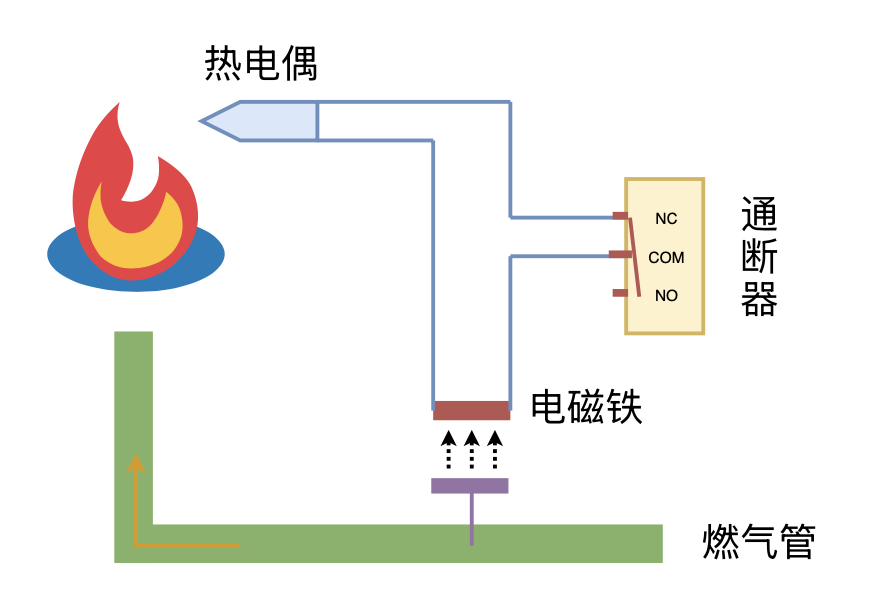
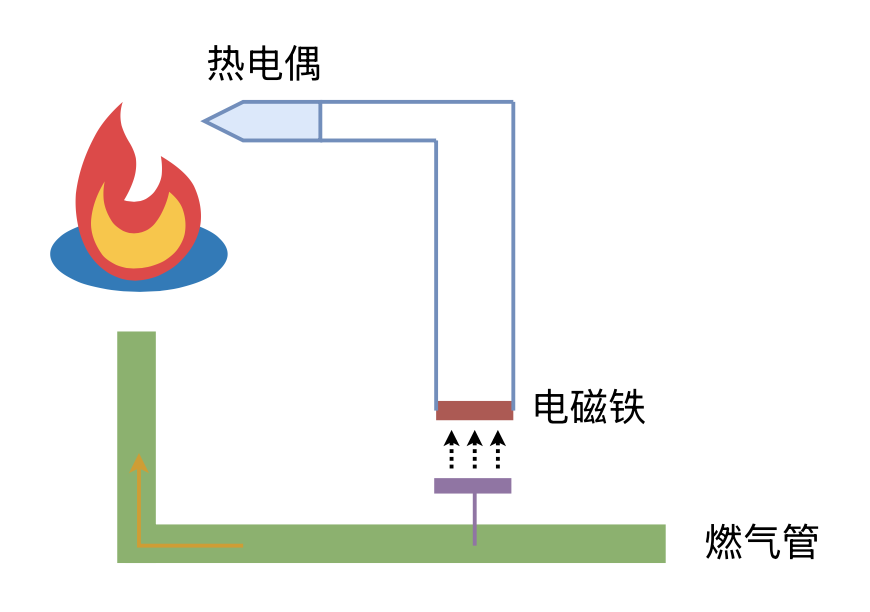
In fact, the composition of the flameout protection device is very simple: it consists of a thermocouple that converts heat into electricity, and a gas pipe valve composed of an electromagnet, as shown in the figure below. When igniting, we first manually open the valve by pressing the knob and then ignite the flame. Once there is a flame, the thermocouple detects the heat and generates electricity, which allows the electromagnet to hold the valve open. If the flame accidentally goes out, the thermocouple stops generating electricity, the electromagnet loses its magnetism, and the valve closes automatically.
Normally Closed Switch
With this foundation, implementing Mi Home smart shut-off is very simple. We only need to connect a smart switch (relay) in series with the flameout protection device. When we need to shut off the fire, we use the smart switch to break the circuit. The electromagnet will lose its magnetism, thereby cutting off the gas and extinguishing the fire without needing to turn the knob.
To achieve a perfect integration, we need to prepare one of the following materials that can connect to Mi Home:
A 4-channel smart switch with normally closed (NC) functionality;
A 2-channel smart switch with normally closed functionality, plus two status registers.
Additionally, it is best to have a power source near the gas stove, because connecting to Mi Home consumes quite a bit of power, and it is difficult to maintain battery life.
Some readers might wonder: a gas stove usually only has two burners, so why do we need a 4-channel switch? Don’t worry, the reason will be revealed soon. First, let’s explain why “normally closed” is needed. “Normally closed” means that the switch is a closed circuit by default when powered off. Obviously, this is to ensure that the gas stove can be ignited normally in the event of a power outage. If you can accept that the stove cannot be used when there is no electricity, then a standard 2-channel switch (which is usually “normally open”) will suffice.
Once prepared, we need to connect the smart switch in series to the flameout protection device using the normally closed terminals. This involves disassembling the gas stove; please research this yourself. Generally, disassembling a gas stove is not very difficult. Once opened, the characteristics of the flameout protection device are very obvious and not hard to find. Overall, the difficulty should not be high. Unfamiliar readers can first look up a few gas stove disassembly videos online.
Inverting the Switch Logic
After installing the smart switch and connecting it to Mi Home, we can control the circuit’s continuity in the app. At this point, we will encounter a somewhat humorous situation: the “On/Off” status in Mi Home is the opposite of the actual circuit state. That is, when Mi Home shows the switch is “On,” the circuit is actually broken (disconnected), and vice versa. This is because the smart switch firmware assumes a normally open wiring by default, so when we connect to the normally closed terminal, the result is exactly inverted.
As a result, we would have to say “XiaoAI, turn on the gas stove” for it to actually shut off the stove. Savvy readers might think: can’t I just set up a manual control scene in Mi Home to turn on the switch and then customize XiaoAI’s command to “Turn off the gas stove”? Yes, this solves the voice command problem, but if you say to XiaoAI, “Turn off the gas stove in ten minutes,” Mi Home will still execute the “Off” operation (whereas we need it to trigger “On” because of the inversion).
Therefore, we need a way to completely invert the switch logic back. This is where the other two channels of the switch come in. We can connect the flameout protection device to the NC terminals of channels 1 and 2, and then set up an automation in Mi Home: when channel 3 or 4 is turned “Off,” channel 1 or 2 is turned “On.” We then name channels 3 and 4 as the “Gas Stove.” This way, when we tell XiaoAI to “Turn off the gas stove,” it actually turns off channel 3 or 4, and due to the automation, it simultaneously turns on channel 1 or 2, thereby shutting off the gas stove.
Channels 3 and 4 do not have actual wiring; they only serve to store the state. Therefore, they can also be implemented using separate status registers (which are essentially virtual switches without relays), but we won’t go into detail here.
Summary
Finally, let’s summarize. To implement smart shut-off using the flameout protection device, you need to prepare a 4-channel smart switch in terms of hardware and connect the NC terminals of channels 1 and 2 in series with the flameout protection device. In Mi Home, set up an automation so that when channel 3 or 4 is turned off, channel 1 or 2 is turned on. At the same time, set each channel of the smart switch to “inching mode” (momentary mode), and set the default state of channels 1 and 2 to “On” and channels 3 and 4 to “Off.”