Background
Since the launch of Cool Papers, many users have suggested adding a search function. Later, I did implement a simple in-page search using JavaScript on the frontend, which solved the needs of some users. However, some readers still hope for a more comprehensive global search. Admittedly, I understand that this need exists. However, the data in Cool Papers accumulates day by day; it has only been online for a month, and the number of papers is not yet massive. Building a large-scale, all-encompassing search engine wouldn’t be very meaningful at this stage. Furthermore, search is not my specialty, and I haven’t yet found a great way to utilize LLMs to optimize search. In short, the conditions are not yet ripe to implement a comprehensive and unique search, so I decided it was better not to do it for now (though everyone is welcome to brainstorm in the comments).
Later, after discussing with colleagues, I came up with a way to "leverage existing resources"—writing a Chrome redirect extension that can redirect to Cool Papers from any page. This way, we can use any method (such as Google Search or the official arXiv search) to find papers on arXiv, and then simply right-click to jump to Cool Papers. This extension was launched on the Chrome Web Store two weeks ago, and the server underwent some adjustments last week to support it. Now, everyone is welcome to try it out.
Extension Address: Cool Papers Redirector
Usage
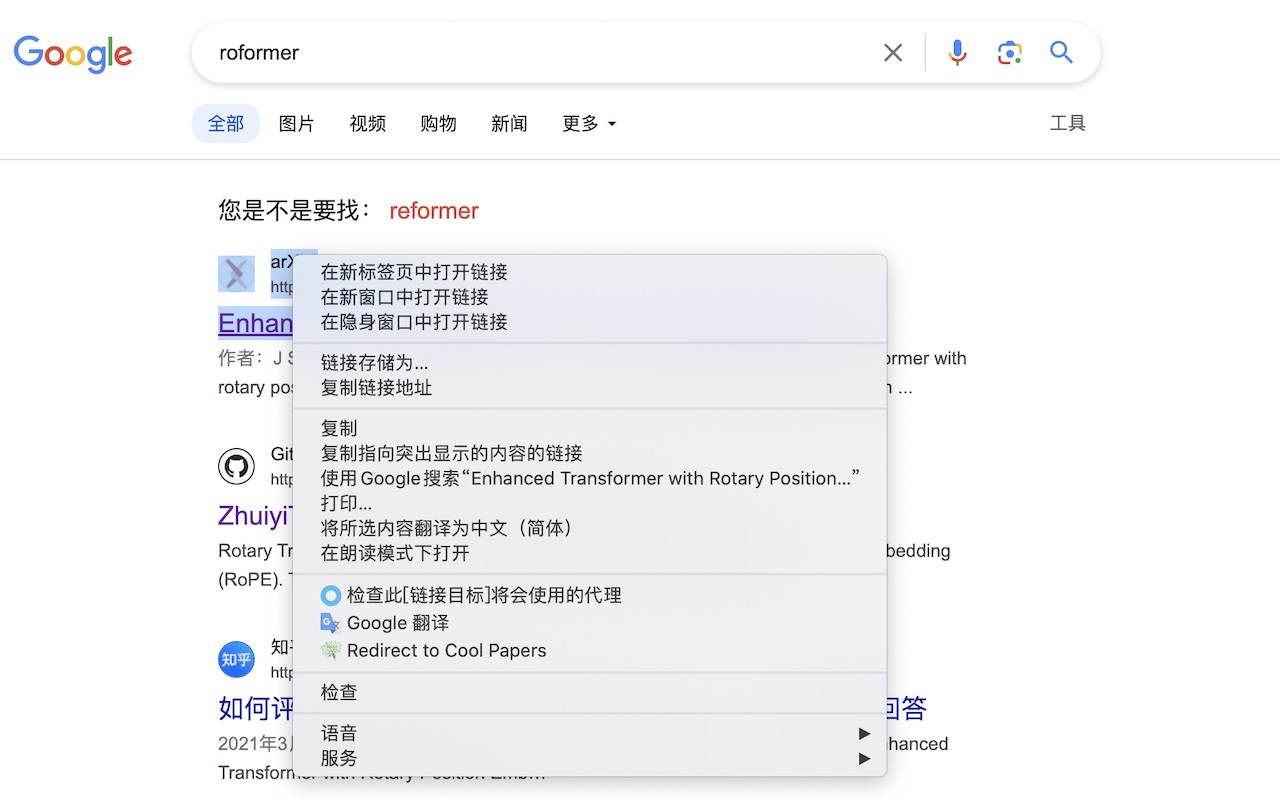
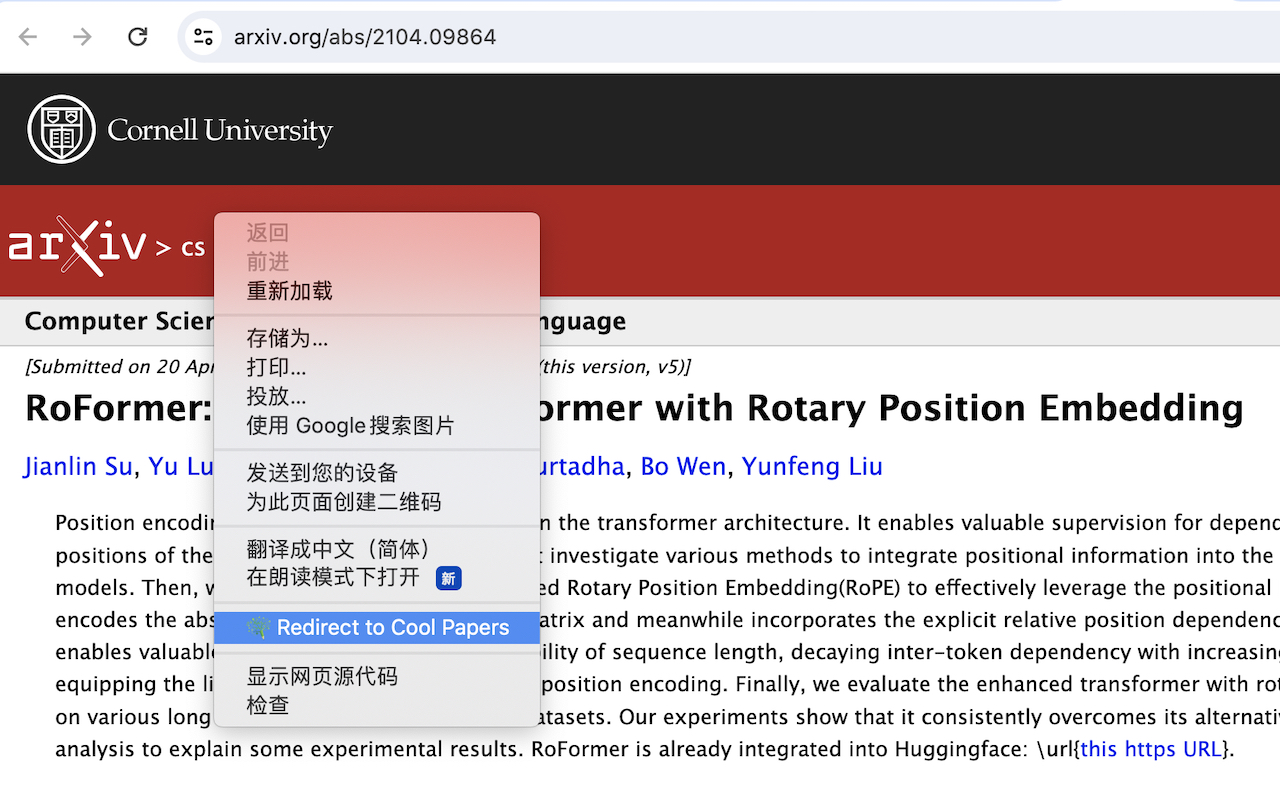
The extension is very simple to use. After installing it in Chrome, search for a paper using any method, then right-click on the relevant area (sometimes even on a blank space). A new option, "Redirect to Cool Papers," will appear. Clicking this option will cause the browser to automatically detect a potential paper ID from the "selected text," "selected link," or "website address" (stopping as soon as one is detected) and automatically jump to the corresponding page on Cool Papers. The effect is as follows:
Opening Up History
In fact, implementing such a redirect extension is relatively simple, requiring only basic HTML and JS—provided, of course, that one has the guidance of both GPT-4 and Kimi.
Since the development of the extension was not difficult, one major
challenge remained: the pressure brought by opening up access to all
historical papers. Many users have already noticed that previously, Cool
Papers allowed access to specific papers via
https://papers.cool/arxiv/<paper_id>, but this was
limited to papers already in the database; otherwise, it would show "Not
Found." If the use of the Cool Papers Redirector is to be popularized,
it is necessary to allow the crawling and access of all historical arXiv
papers. Otherwise, if eight out of ten papers result in a "Not Found"
error, the Redirector would be almost useless.
To open up historical papers while ensuring the main purpose of Cool Papers—browsing the latest papers of the day—proceeds normally, I have implemented a multi-priority design for the arXiv crawling queue and the Kimi conversation queue (currently divided into three levels). First, "Super VIP" is for internal permissions, unlocked by entering the correct Magic Token; this is irrelevant to ordinary visitors. Second is the priority for the current day’s papers. After the scheduled time, the arXiv queue prioritizes fetching the list of the day’s papers before processing historical paper requests. Similarly, the Kimi queue prioritizes the day’s papers, which automatically "jump the queue" ahead of historical papers. Finally, the crawling of historical papers and Kimi processing are assigned the third priority.
In this way, we can basically ensure that reading the day’s papers is not affected, while utilizing idle resources to process historical papers.
Other Updates
Compared to when "I wrote an auxiliary website for browsing papers: Cool Papers" and "Happy New Year! Recording the development experience of Cool Papers" were first published, Cool Papers has improved significantly in terms of functionality after a month of refinement (though the interface remains as simple as ever). In addition to opening access to all historical papers as mentioned in this article, other changes include:
A bar has been added to the bottom, allowing users to search for papers, view/export reading history, etc. Note that these functions are limited to the current page.
Support for paper lists from specific dates. You can select a date via the calendar icon on the right side of the categories on the homepage, or by clicking the date text on the list page.
Switched to PDF.js for PDF previews, supporting paper browsing on mobile devices. At the same time, PDF text parsing has been optimized to improve the quality of [Kimi] summaries.
In the 4th Bar button, [Kimi] can be switched to English output, making it convenient for international users or those who need to compare with the original English text.
A large number of minor bug fixes.
Overall, the interface doesn’t look much different, but in reality, there are improvements almost every day. Compared to the initial version, the source code has "evolved beyond recognition." The next steps may involve adding other paper sources, such as OpenReview and bioRxiv. Please stay tuned!
Summary
This article shared a new way to open Cool Papers via a Chrome redirect extension and briefly reviewed the recent changes to Cool Papers.
When reposting, please include
the original address of this article:
https://kexue.fm/archives/9978
For more detailed reposting
matters, please refer to:
"Scientific Space FAQ"