Some time ago, I bought a Xgimi projector. It was only after I started tinkering with it that I realized Xgimi has almost no relationship with Xiaomi; it cannot interact with Xiao Ai at all. Among the many brands with "Mi" in their names, Xgimi is one of the few that cannot be integrated into the Mi Home ecosystem. I imagine many users were initially misled by the name "Xgimi." The kicker is that Xgimi projectors are even sold on the Xiaomi Mall (facepalm).
Since I already bought it and the seven-day no-reason return period has passed, returning it is not an option. I could only try to tinker with it to see if I could force some interaction.
Existing Solutions
First, I searched online. The reference solutions provided by netizens generally fall into a few categories. One is using a "Mi Home Smart Plug + Power-on Auto-boot" to control the power (in fact, the main automation needed is switching it on and off). Another is connecting it to Home Assistant and controlling it via ADB. A third option is modifying the remote control by adding an infrared (IR) module to it, thereby using Xiao Ai’s IR remote control function.
Among these, the "Mi Home Smart Plug + Power-on Auto-boot" method is relatively simple. However, while it works for turning the device on, turning it off is not easily achieved—one must either use the remote or resort to a "violent" power cut. The technical path for Home Assistant is quite long, so I won’t consider it for now. Modifying the remote requires high manual dexterity (soldering is needed). For those not good with manual work, there are ready-made modification services or pre-modified products available on Taobao (but they cost around 500 RMB). The advantage of modifying the remote is that it basically preserves all remote functions, but the downside is that the original remote is essentially ruined and can only be used via voice-controlled IR. Additionally, I have to complain: if you’re going to modify the remote anyway, wouldn’t it be better to just solder a Mi Home smart switch directly? Why go through the extra step of IR?
Principle Analysis
In summary, the above solutions all have their pros and cons, and none were particularly satisfying to me. After repeated searching, I finally found a "perfect solution" that requires almost no modification and has extremely low hardware and learning costs.
The principle is simple. A method like modifying the remote is theoretically suitable for turning any appliance into a smart-controlled one. However, for a Xgimi projector, it is not just an appliance; it is also a computer running the Android operating system. What are the characteristics of a computer? It can be controlled by a mouse and keyboard, and there can be multiple mice and keyboards, both wired and wireless. We can view the remote control that comes with the Xgimi as a Bluetooth keyboard for the computer. Therefore, theoretically, we can connect another wireless keyboard to control it. This way, the original remote is not affected, and a new control channel is added.
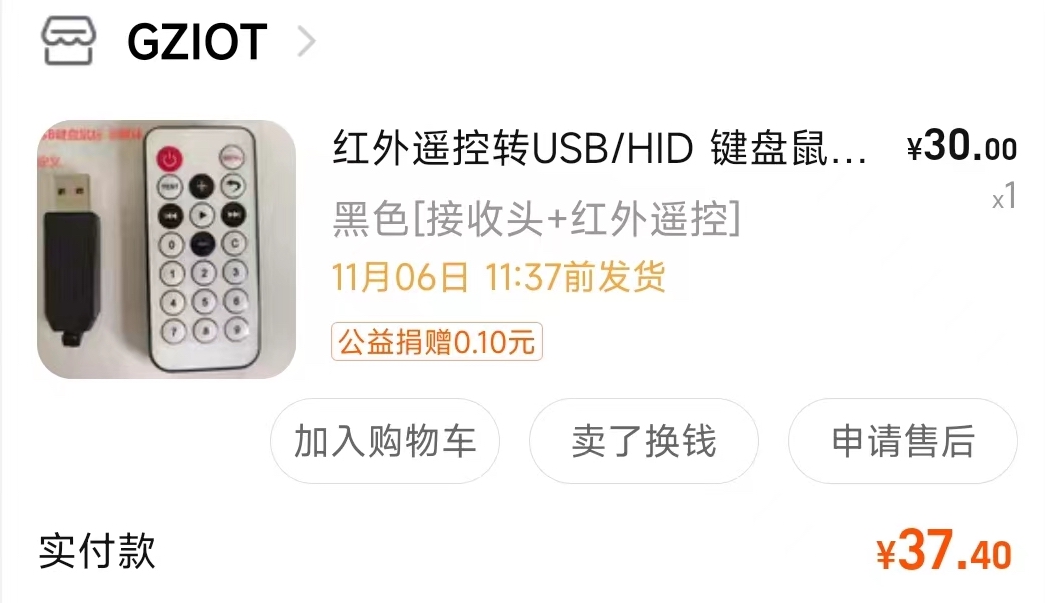
But there is a problem: most mainstream wireless mice or keyboards are based on Bluetooth or 2.4G communication. These communication methods are one-to-one, and Xiao Ai cannot intervene. What communication method can Xiao Ai use? The only one built into Xiao Ai is IR. Therefore, we need an "IR wireless keyboard" (strictly speaking, we only need the receiver). I searched Taobao, and such a thing actually exists, and it’s not expensive!
The New Solution
What does this device do? It’s simple: it can receive IR signals and map them to specific keys (it is learnable). It supports many keys, including standard keyboard keys, mouse operations, and multimedia operations. The multimedia section is shown below:
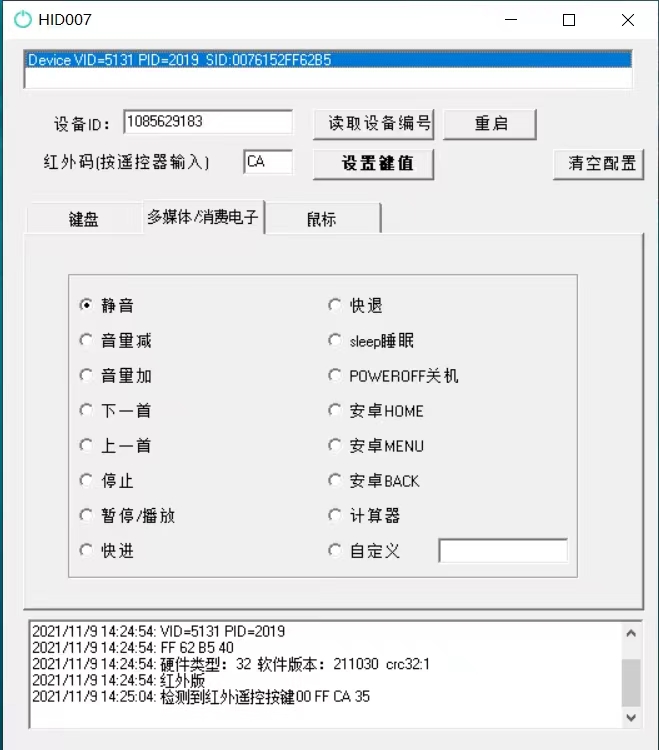
So, the idea is now very clear. Buy such an IR learning module, plug it into a computer, and open the configuration software. On the Xiao Ai side, add any IR projector remote. Place Xiao Ai and the IR learning module in the same location. Press any button on the IR projector remote (such as the power button), and the configuration software will display the corresponding received signal. In the configuration software, map that signal to the corresponding functional key (such as Power Off). Tests have shown that keys like Power Off, Volume Up/Down, Mute, OK, and Pause are all functional on the projector.
After learning is complete, plug it into the USB port of the Xgimi projector. You can then use Xiao Ai’s IR remote to control the Xgimi projector. With IR control, you can also set up scenes for voice control, which I won’t detail here. Overall, there are only two functional keys that cannot be learned. The first is the voice input key built into the Xgimi remote. Xgimi’s voice control uses "near-field voice," and the microphone is on its own remote, so it must be used with the original remote. However, in practice, Xgimi’s built-in voice assistant is quite poor, so it’s no great loss. The other is that the power key can only turn the device off, not on. This is easy to understand: we can use a mouse or keyboard to shut down a computer, but it’s rare to see a mouse or keyboard that can turn a computer on.
Therefore, turning it on still requires the "Mi Home Smart Plug + Power-on Auto-boot" method, while turning it off can be done using the IR remote we just learned. So how do we achieve power-off and disconnection? (If the power isn’t cut, it won’t be able to auto-boot next time). Some smart plugs have power statistics functions; you can set it to cut power after low power consumption persists for a period. That is one solution. What if there is no power statistics function? It’s also simple: just keep the plug powered on by default. Set a "Projector On" scene where the action is "Turn off the plug for 10 seconds and then turn it back on." That is, the plug is powered on by default until you want to turn the projector on; then it cuts power briefly and restores it, and the Xgimi projector will then boot up via "Power-on Auto-boot."
Summary
This article explored a "nearly perfect" solution for controlling a Xgimi projector with Xiao Ai.
When reposting, please include the original article
address:
https://kexue.fm/archives/9365
For more detailed reposting matters, please refer
to:
"Scientific Space FAQ"