In fact, besides writing blog content, over the past few years, I have spent a considerable amount of time on the “surface work” of Scientific Space. For this purpose, I specifically learned a bit of PHP, CSS, and JS. While I wouldn’t claim it is perfect, the overall browsing experience of the website should be much better than in previous years.
Considering that some readers might need certain features but may not notice them immediately, I have compiled some tips for using the site.
Articles
What is the best environment for reading articles?
Two years ago, Scientific Space implemented a responsive design that automatically adapts to screens of different resolutions. Therefore, the text content should be clear regardless of the resolution. The only issue is that on small-screen mobile phones, mathematical formulas might not display fully or may appear misaligned. For a better experience reading formulas, it is best to read on a screen larger than 7 inches. If you must use a small-screen phone, consider reading in landscape mode.
Are PDF versions of articles available? Can they be printed?
Articles do not provide a PDF version, nor do they provide LaTeX manuscripts (because I don’t have them; I write directly online).
If you need to print, simply go to the article page. You will see a “Print” button near the title. After clicking “Print,” most irrelevant blog content will be cleared, leaving only the main body of the article, which can then be printed cleanly onto paper.

If your computer has a PDF printer installed (like the one built into macOS), you can select “Print to PDF” in the print window. This is the method for saving an article as a PDF.
How to share articles with others?
If you are willing to share articles from Scientific Space with others, I would be extremely honored. A quick way to share is also via the “Share” button in the title bar:

Of course, you can also manually copy and paste the link.
How to repost or cite articles?
This site uses the “Attribution-NonCommercial-NoDerivs” license. Reposting is not prohibited, but you must credit the source as this site, include the source link, and refrain from commercial use.
By the way, while reposting is allowed, for platforms with original content identification (such as WeChat Official Accounts), if you wish to repost an article from this site as an “Original” post, you must contact me privately and obtain my authorization. Otherwise, I will pursue relevant responsibilities to the best of my ability.
As a matter of basic respect, please do not perform simple “content spinning” on articles and publish them as your own “original” work.
If you wish to cite articles from this blog in your own work, that is also a great honor. For a basic format, please click the “Cite” button in the title bar:

Of course, this is just a reference format. In fact, I don’t know the standard format for citing web pages; you can use your judgment. I am already very happy that you have the intention. A BibTeX format might be useful for reference:
@misc{
  jianlin2019bdkg,
  title={Hybrid Structure of Pointer and Ragging for Relation Extraction: A Baseline},
  author={Jianlin Su},
  year={2019},
  publisher={GitHub},
  howpublished={\url{https://github.com/bojone/kg-2019-baseline}},
}
Just replace the content as needed.
Search
Search Method 1: Internal Search
The most basic method is to use the site’s internal search. Simply enter the content you want to search for into the “Smart Search” box on the right side of the site:

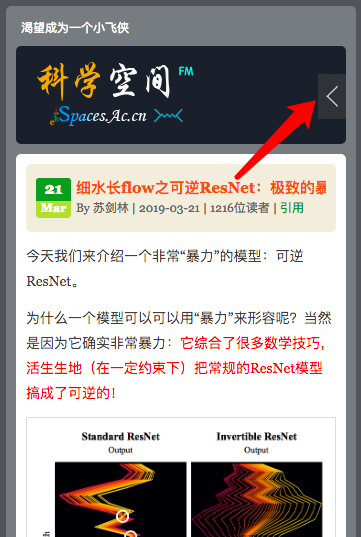
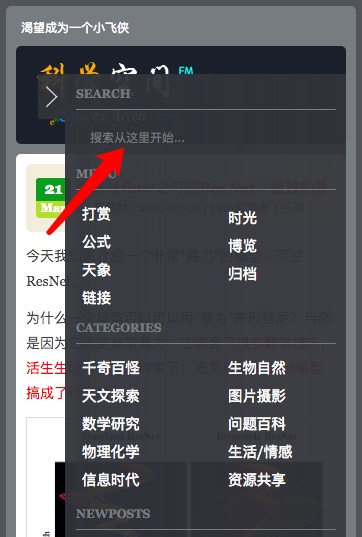
It supports full-sentence input, automatically performs word segmentation, and extracts key information for ranking. Personally, I think it is a fairly intelligent search. By the way, on mobile devices, you need to click the button at the top right for it to appear:
Search Method 2: Categories and Tags
“Searching” is essentially a way to narrow down your reading range and better locate the information you need. Article categories and tags can also serve this purpose.
Every article has its own category and tag information. Categories are defined by the author, and tags are manually extracted rather than machine-generated:

All categories on this site:

Address formats for categories and tags:
“Information Age” Category: https://kexue.fm/category/Big-Data
“Flow Models” Tag: https://kexue.fm/tag/Flow-Models/
Search Method 3: Archive Page
On the Archive page, you can see a list of all articles on the site: https://kexue.fm/content.html
Perhaps you can find something you like there.
Search Method 4: Web Search Engines
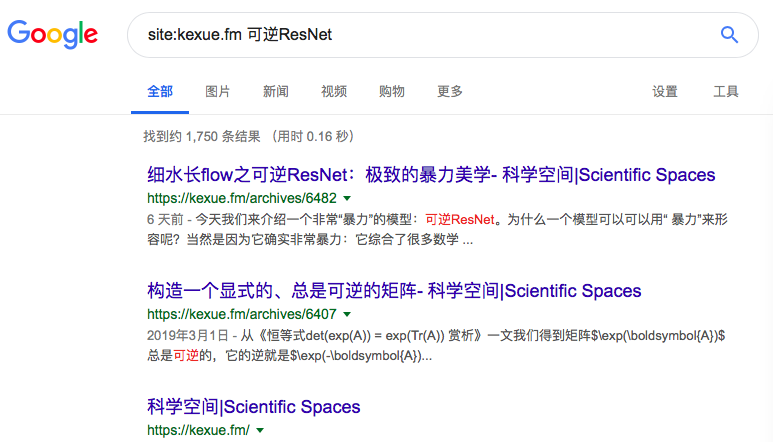
The current disadvantage of the internal search in Method 1 is that it cannot search through comment content. A more comprehensive search can be achieved using existing search engines like Google, Baidu, or Bing. Simply type the following into their search boxes:
site:kexue.fm [your keywords]
or
site:spaces.ac.cn [your keywords]
Due to historical reasons, this site uses dual domain names; you can try both.
Miscellaneous
Is there a technical exchange group?
Naturally, there is. For the QQ group, please search for group number 67729435. For the WeChat group, please add the WeChat bot spaces_ac_cn.
Basic group rules: In principle, any content related to science and technology can be discussed. Beginners, experts, and recruiters are all welcome, but please refrain from spamming. Also, speak and act with caution; unless necessary, please keep the group quiet.
How to give feedback or complaints?
Didn’t I just mention the comment function? You can leave a message directly under this article.
Conclusion
May you have a wonderful experience at Scientific Space!
When reposting, please include the address of this article: https://kexue.fm/archives/6508
For more detailed reposting matters, please refer to: Scientific Space FAQ
Comments
How to comment on an article?
You can comment under every article. Specifically, clicking the “Preview” button allows you to see how your comment will look, which should be very helpful for inputting LaTeX mathematical formulas.
Note that the server response may occasionally be slow. After clicking “Submit Comment” once, wait a moment and do not rush to click it a second time, otherwise you might submit duplicate comments (though it doesn’t matter much, as I will manually delete duplicates).
How to discuss with other commenters?
You can click “Reply” directly under a specific comment to create a nested reply. However, nesting only supports up to 10 levels. If the nesting exceeds 10 levels, the “Reply” button will disappear. In this case, you can reference someone else’s comment by clicking the comment number.
Will commenting leak my information?
Commenting requires a nickname and an email address; you can optionally fill in your personal homepage URL. The front end will only display your nickname and personal homepage, not your email address. Therefore, it will not lead to spam harassment.