When working on Windows, I often use Xunlei to download files. If the speed is slow or there are no resources—especially for some less popular videos—Xunlei’s VIP membership service always comes in handy. Later, I accidentally discovered a software called "Xunlei VIP Account Fetcher," which can obtain temporary VIP accounts for use. This is a great tool because, while a Xunlei membership isn’t expensive, I don’t download things frequently, so it always felt like a bit of a waste. With this tool, I can use it for free whenever I need to download something.
Recently, I moved to Mac, and although Mac also has Xunlei, that
account fetcher is an .exe file and cannot run on Mac. I
initially thought the structure of the fetcher would be very complex,
but after some packet capture analysis, I found that the principle of
the account fetcher is extremely simple. To put it bluntly, it is just a
simple web crawler. The following two websites provide accounts, and the
tool simply scrapes the corresponding accounts from them:
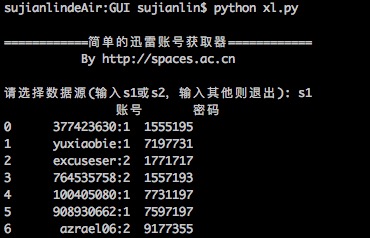
Based on this, I also wrote a simple one in Python, mainly for my
convenience on Mac. If readers need it, they can also download and use
it. The code is compatible with both Python 2.x and 3.x versions. The
main libraries used are requests and re; the
use of pandas and sys is just to make it more
user-friendly. I originally thought about writing a simple GUI using
Tkinter, but on second thought, it didn’t seem necessary.
# -*- coding:utf-8 -*-
'''
2016.01.21 Update: Modified the regular expression to make it more general;
added an additional account source.
'''
import requests as rq
import re

def get1():
    source = 'http://yunbo.xinjipin.com/articlelist/?33.html'
    web = rq.get(source).text
    url = re.findall('<li><p><a href=\"(.*?)\" title=', web)[0]
    web = rq.get('http://yunbo.xinjipin.com%s'%url)
    web.encoding = 'gb2312'
    web = web.text
    # Searching for Xunlei account and password patterns using Unicode escapes
    return re.findall(u'\u8fc5\u96f7.*?([a-zA-z0-9\:]+?)[\u5bc6\u7801]+?([a-zA-z0-9]+?)</div>', web)

def get2():
    source = 'http://www.fenxs.com'
    web = rq.get(source).text
    url = re.findall(u'<h2><a href=\"(.*?)\" title=.*?\u8fc5\u96f7\u4f1a\u5458\u8d26\u53f7\u5206\u4eab.*?</a></h2>', web)[0]
    web = rq.get(url).text
    return re.findall(u'\u8fc5\u96f7.*?([a-zA-z0-9\:]+?)[\u5bc6\u7801]+?([a-zA-z0-9]+?)<br />', web)

def get3():
    source = 'http://xlfans.com'
    web = rq.get(source).text
    url = re.findall(u'<h2><a href=\"(.*?)\" title=.*?\u8fc5\u96f7\u4f1a\u5458\u8d26\u53f7\u5206\u4eab.*?</a></h2>', web)[0]
    web = rq.get(url).text
    return re.findall(u'\u8fc5\u96f7.*?([a-zA-z0-9\:]+?)[\u5bc6\u7801]+?([a-zA-z0-9]+?)<br />', web)

if __name__ == '__main__':
    import pandas as pd # For formatted output
    import sys # To determine system version

    print('\n============ Simple Xunlei Account Fetcher ============\n           By http://kexue.fm\n')
    while True:
        if sys.version_info[0] < 3:
            s = raw_input('Please select data source (enter s1, s2, or s3; enter anything else to exit): ')
        else:
            s = input('Please select data source (enter s1, s2, or s3; enter anything else to exit): ')

        if s == 's1':
            print(pd.DataFrame(get1(), columns=['Account', 'Password']))
        elif s == 's2':
            print(pd.DataFrame(get2(), columns=['Account', 'Password']))
        elif s == 's3':
            print(pd.DataFrame(get3(), columns=['Account', 'Password']))
        else:
            break
When reprinting, please include the original address of this article: https://kexue.fm/archives/3594
For more detailed reprinting matters, please refer to: Scientific Space FAQ