I have recently become fascinated by data mining and machine learning. To perform data analysis, one must first have data. For ordinary people like us, the cheapest way to obtain data is likely using a crawler to scrape it from the web. This article records my entire process of crawling data for a specific product on Tmall. The approach for Taobao stores is similar and will not be repeated. The focus is on analyzing the page and implementing a simple and convenient crawl using Python.
The tools I used are as follows:
Python 3 — An extremely convenient programming language. Version 3.x was chosen because it is more friendly toward Chinese character processing.
Pandas — An additional Python library used for data organization.
IE 11 — Used to analyze the page request process (other similar traffic monitoring tools would also work).
The remaining tools include requests and re, which are standard or commonly used libraries in Python.
Example page (a Midea water heater): http://detail.tmall.com/item.htm?id=41464129793
Where are the reviews?
To crawl review data, you must first find where the reviews actually reside. If you open the aforementioned URL and view the source code, you will find that the review content is not there! So, where is the review data? It turns out that Tmall uses AJAX encryption; it loads review data from a separate page.
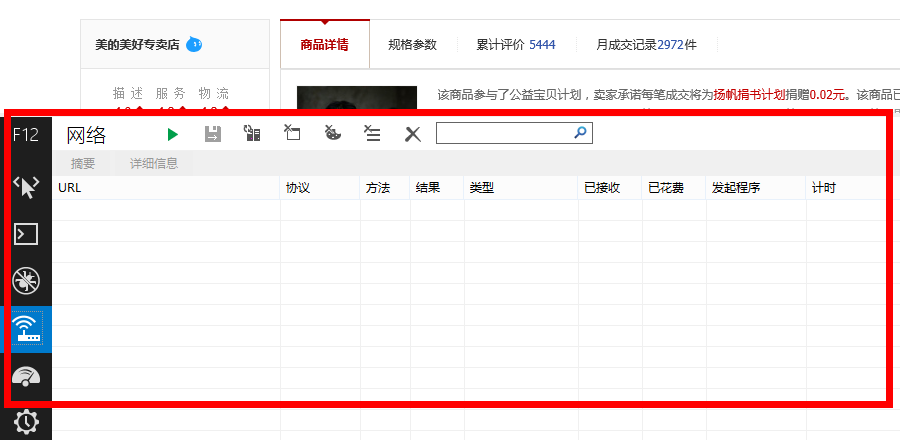
This is where IE 11 comes in handy (of course, you can use other traffic monitoring tools). Before using it, open the URL above. Once the page is loaded, clear the IE 11 cache and history, then press F12. The following interface will appear:
At this point, click the green triangle button to start capturing network traffic (or simply press F5), and then click on "Cumulative Reviews" on the Tmall page:
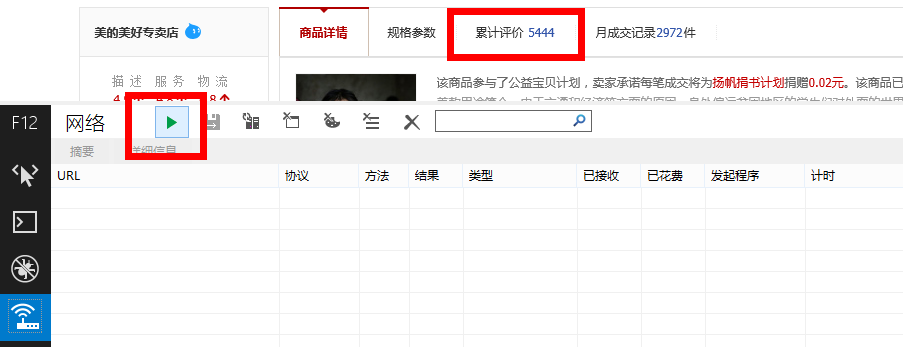
The following results will appear:
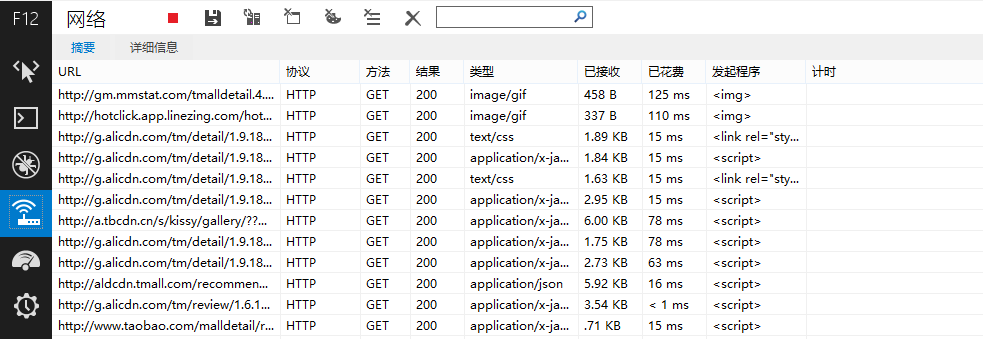
Many URLs will appear under the URL column, and the review data is hidden among them! We should mainly look for URLs with types like "text/html" or "application/json." After testing, I found that Tmall’s reviews are located within the following URL:
Does it feel dizzyingly long? Don’t worry. With a little analysis, you will find it can be simplified to the following parts:
http://rate.tmall.com/list_detail_rate.htm?itemId=41464129793&sellerId=1652490016¤tPage=1
We find that Tmall is quite generous; the review page addresses are
very regular (unlike Jingdong, which is completely irregular and
randomly generated). Here, itemId is the product ID,
sellerId is the seller ID, and currentPage is
the page number.
How to crawl?
After some effort, we finally found where the reviews are. Next is the crawling. How do we do it? First, let’s analyze the page structure.
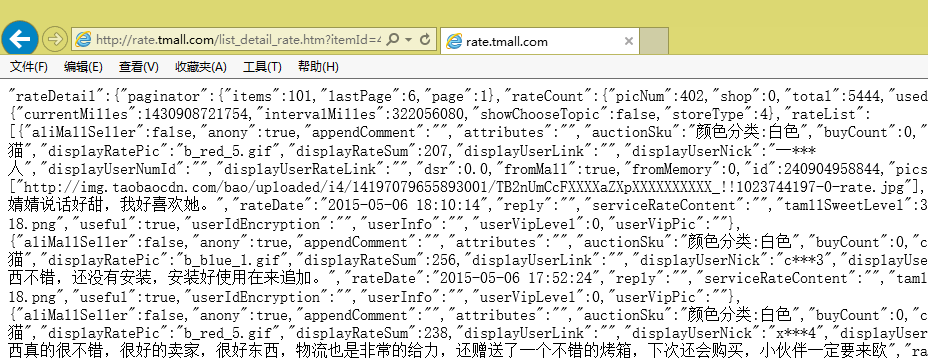
We find that the page data is very standardized. In fact, it is in a
lightweight data exchange format called
JSON (you can search for JSON). However, it is not
standard JSON. Specifically, the content inside the square brackets
[] in the page is the valid JSON-formatted text.
Let’s begin our crawl. I use the requests library in
Python. Enter the following in Python:
import requests as rq
url = 'http://rate.tmall.com/list_detail_rate.htm?itemId=41464129793&sellerId=1652490016¤tPage=1'
myweb = rq.get(url)Now the content of the page is stored in the myweb
variable. We can view the text content using
myweb.text.
Next, we need to keep only the part inside the square brackets. This
requires regular expressions, involving the re module.
import re
myjson = re.findall('\"rateList\":(\[.*?\])\,\"tags\"', myweb.text)[0]
Wait, what does this line of code mean? Readers familiar with Python can probably understand it. If not, please read a tutorial on regular expressions first. The meaning above is to search for the following pattern in the text:
"rateList":[...],"tags"
Once found, it keeps the square brackets and the content inside them. Why not use the square brackets directly as the tag? It is to prevent errors if square brackets appear within a user’s review.
Now that we have captured myjson, it is a standard JSON
text. How do we read JSON? It’s simple: just use Pandas. This is a
powerful data analysis tool in Python that can read JSON directly. Of
course, if you only want to read JSON, you don’t strictly need it, but
we also need to consider merging the data from each review page of the
same product into a single table and performing preprocessing. In such
cases, Pandas is very convenient.
import pandas as pd
mytable = pd.read_json(myjson)
Now mytable is a standard Pandas DataFrame:
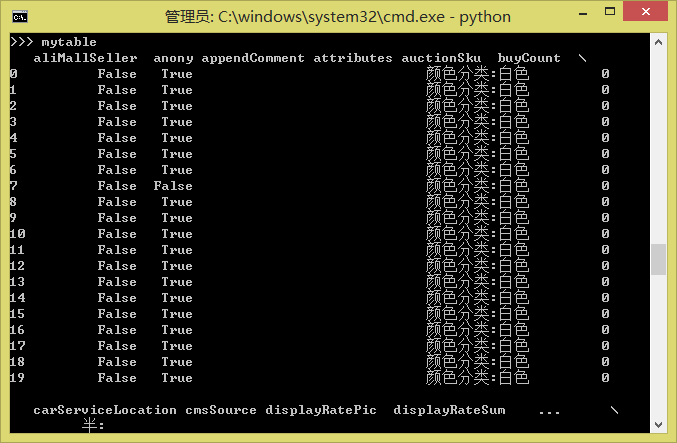
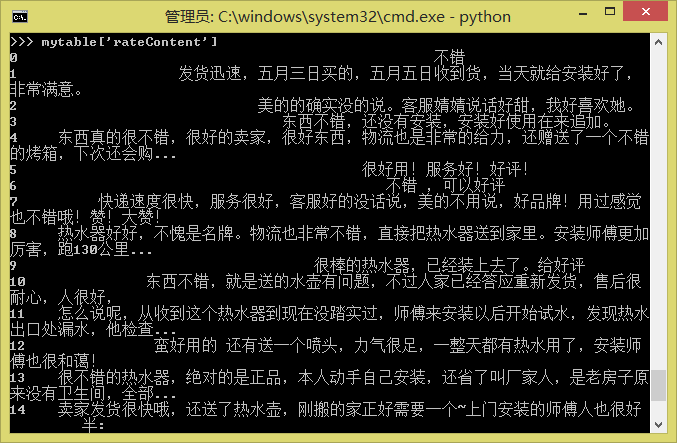
If you have two tables, mytable1 and
mytable2, that need to be merged, you simply use:
pd.concat([mytable1, mytable2], ignore_index=True)For more operations, please refer to Pandas tutorials.
Finally, to save the reviews as a .txt or Excel file
(since there may be encoding issues with Chinese when saving to
.txt, saving to Excel is often better, and Pandas can
read/write Excel files easily):
mytable.to_csv('mytable.txt')
mytable.to_excel('mytable.xls')
A Brief Conclusion
Let’s see how many lines of code we used in total.
import requests as rq
import re
import pandas as pd
url = 'http://rate.tmall.com/list_detail_rate.htm?itemId=41464129793&sellerId=1652490016¤tPage=1'
myweb = rq.get(url)
myjson = re.findall('\"rateList\":(\[.*?\])\,\"tags\"', myweb.text)[0]
mytable = pd.read_json(myjson)
mytable.to_csv('mytable.txt')
mytable.to_excel('mytable.xls')Nine lines! In less than ten lines, we completed a simple crawler program and successfully scraped data from Tmall! Are you eager to try it out?
Of course, this is just a simple example. For practical use, you would need to add features such as finding out how many total pages of reviews there are and reading them page by page. Additionally, batch-acquiring product IDs is something that needs to be implemented. These are left for everyone to explore freely; they are not difficult problems. This article only hopes to serve as an introduction and provide a simple guide for readers who need to crawl data.
The most difficult problem is likely that after large-scale collection, you might be detected by Tmall’s system, which will then require you to enter a CAPTCHA to continue. This is much more complex. Solutions include using proxies, using longer intervals between crawls, or using OCR systems to recognize CAPTCHAs. I do not have a perfect solution for this yet.
When reposting, please include the original address of this article: https://kexue.fm/archives/3298
For more detailed reposting matters, please refer to: Scientific Space FAQ